The finding made it into the dictation.
The guideline never made it into the report. You saw it, you said it, it's in the Findings — but the Fleischner interval, the Bosniak category, the LI-RADS call live in a white paper, a calculator, or somebody's macro. On read 40 of a long list, the distance between what you knew and what the report says is the whole problem.
One Windows program file to download: no installer, no administrator rights. Needs Windows 10 or 11; tested with PowerScribe 360.
One Windows program, two apps: the Impression app beside your reporting system, and the Dictation app. See pricing · Residents & fellows: $49/month
- Built by a practicing interventional radiologist
- Lead author, 1,430-device FDA AI study Cureus
- Covered by AuntMinnie
- StatPearls / NCBI editorial board
- Op-ed on monitoring clinical AI Capitol Weekly
 Member of NVIDIA Inception Startup credits awarded by AWS and Google Cloud.
GigHz Precision AI is a radiology reporting assistant for Windows, built by a practicing interventional radiologist. It is one program with two apps and a switch at the top of the window.
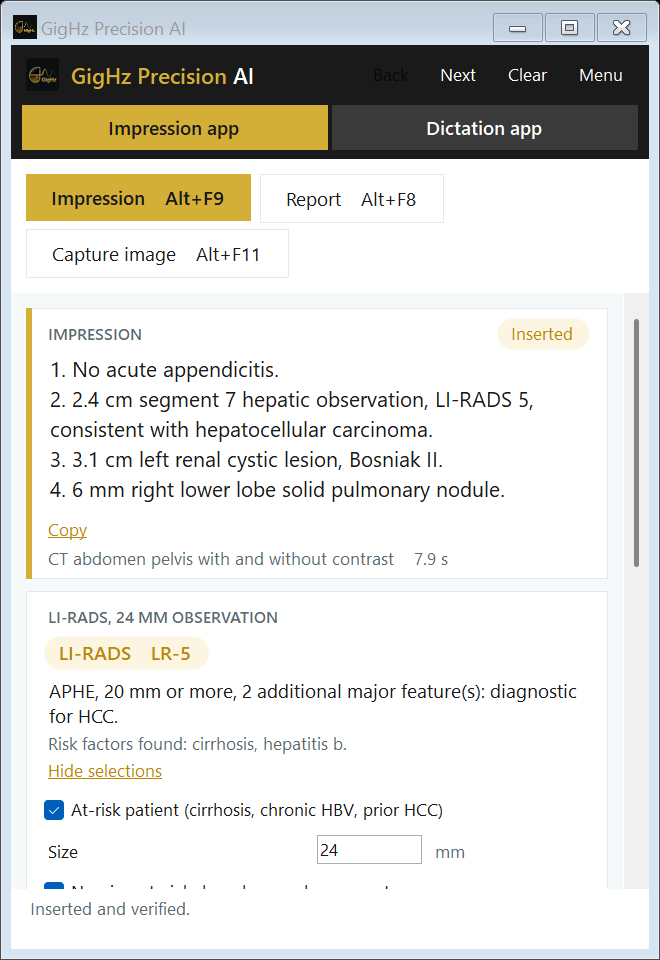
The Impression app is the small window beside your own reporting system (tested with PowerScribe 360). Dictate as always and press Impression (Alt+F9): the impression is written under IMPRESSION, with the scoring (LI-RADS, Bosniak, Fleischner, TI-RADS and others) and the guideline behind each recommendation beside it. Report (Alt+F8) puts your dictated findings on the lines of the template open in your report.
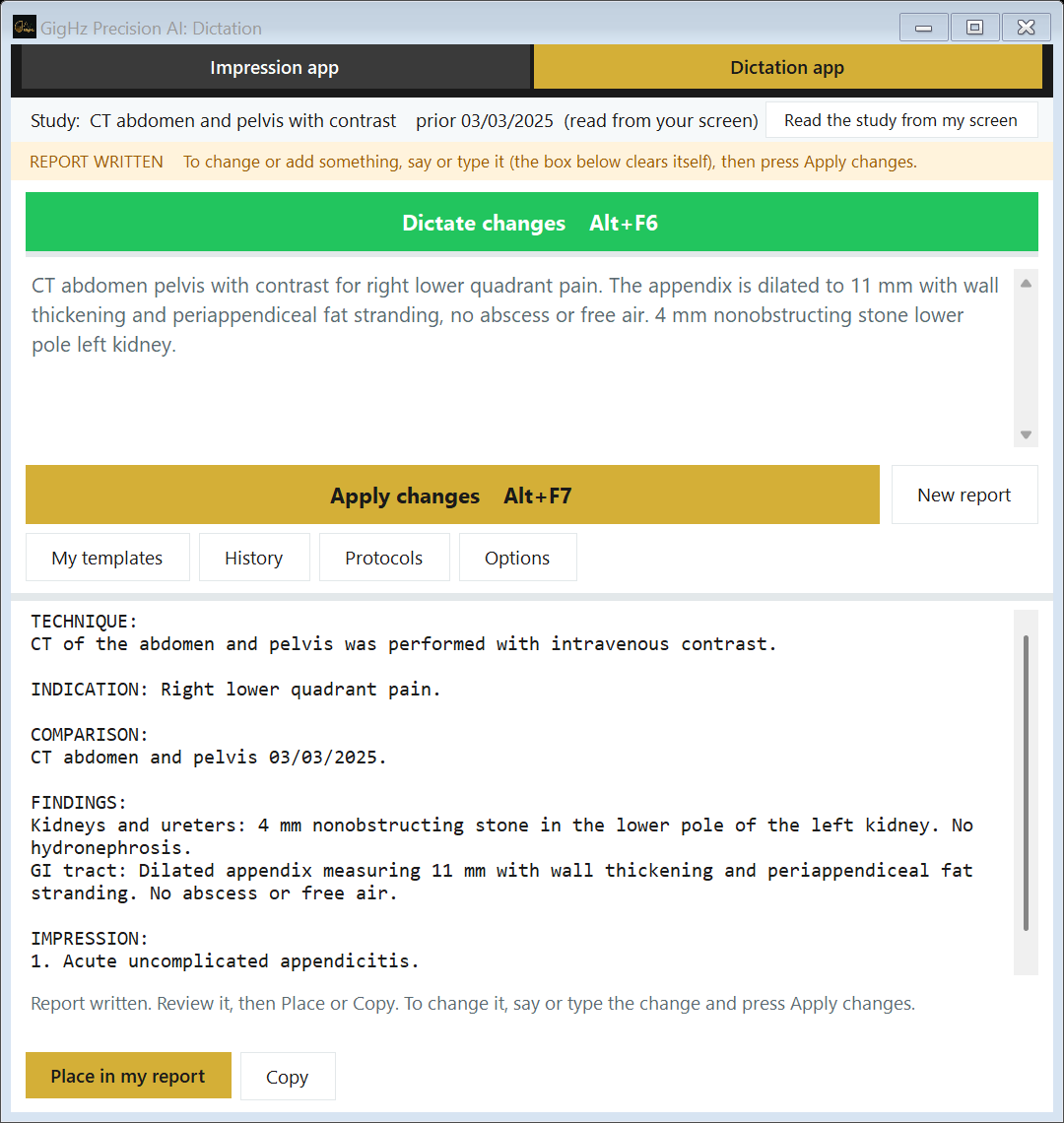
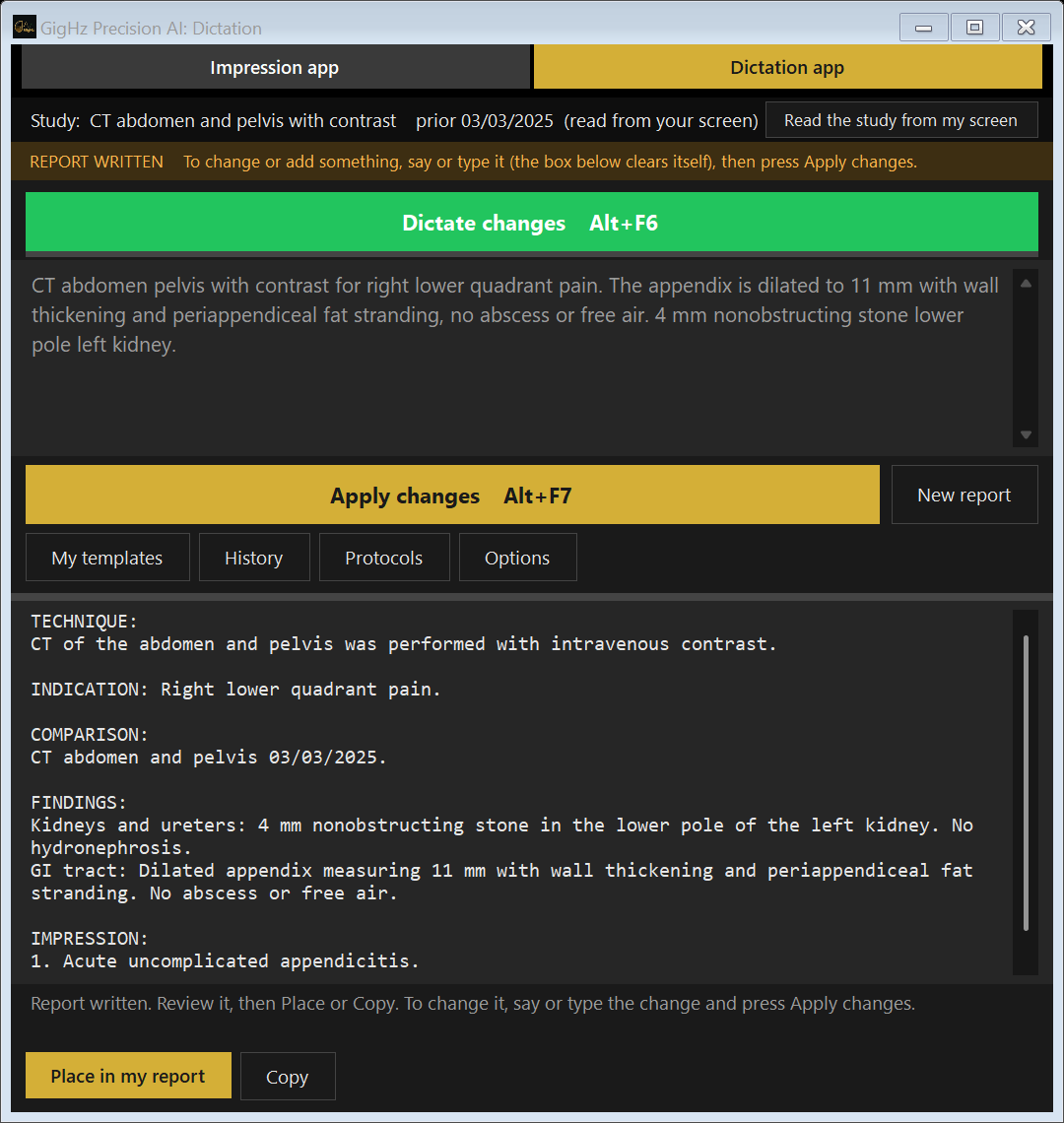
The Dictation app is the full dictation system. Dictate, type or paste the findings and press Generate report: the study is never guessed (it comes from your dictation, from the study details you marked on your PACS screen, or the app asks), the whole report is written with its impression, and Place in my report writes the comparison, findings and impression into the template open in your reporting system (tested with PowerScribe 360). Change it by saying or typing what should change, use your own templates, and look up imaging protocols without leaving the app.
Every report and impression is a draft for you to review and sign. It needs Windows 10 or 11; Mac and Citrix or Remote Desktop are not supported. Nothing to install: download one file and sign in with your account, on one computer at a time.
The impression is written in the language of the report, or in English, Spanish, Italian, French, German, Portuguese or Hebrew if you choose one. Languages →
See it work: try it yourself
The demo shows the Impression app: pick a sample study, edit the findings, press Impression and watch the impression land in a sample report, with the scoring beside it. Three tries, no email, no card, no account.
The demo uses synthetic sample reports. The full product is the Windows program, with both apps.
You saw the nodule. Did the follow-up recommendation follow it?
Radiologists don't miss structured-reporting details because they're lazy — they miss them because the workflow is noisy. A long list, a new template, a prior report with vague language, a lung nodule where follow-up depends on size, density, age, and risk, a cystic renal lesion where one word changes the Bosniak category. Precision AI is built around those friction points.
Scoring under fatigue
LI-RADS, Bosniak, Lung-RADS, PI-RADS, BI-RADS, TI-RADS, adrenal washout, and Fleischner recommendations all require details to be applied correctly. Precision AI helps surface the relevant logic when the report contains enough information.
Report-language drift
The same finding may be reported four different ways across a group, which makes follow-up harder for clinicians and quality review harder for the practice. Precision AI helps standardize the draft language while leaving final judgment with the radiologist.
Too many separate tools
White papers, calculators, macros, templates, and prior reports all live in different places. Precision AI tries to keep more of that support inside the reporting pass.
What Precision AI brings into the report
The system recognizes from context which scoring framework applies. The radiologist describes the finding; the classification surfaces inline.
LI-RADS — surfaced for review
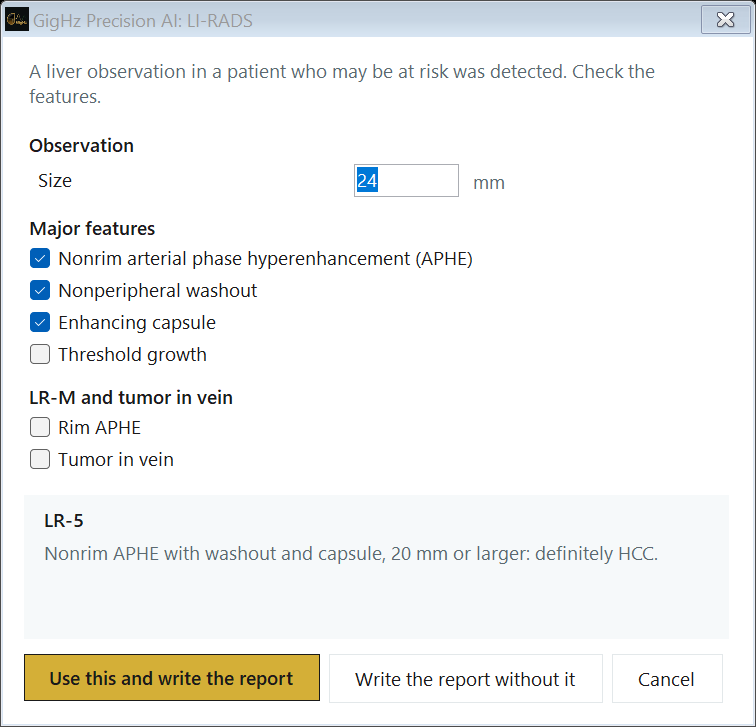
Describe a liver lesion with size, arterial enhancement, and washout — Precision AI surfaces the LI-RADS category in the impression, with rationale traceable to the criteria. Major and ancillary features mapped for your review.
Fleischner + Lung-RADS — embedded
Pulmonary nodule size, density, and growth context produce Fleischner follow-up recommendations or Lung-RADS scoring directly in the impression. Defensible documentation, no separate worksheet.
Bosniak v2019 — current criteria
Cyst features → Bosniak category, with the right thresholds for septations, wall thickness, and enhancement. The version that referring urologists actually use, not the 2005 version that's still in some templates.
Washout — calculated for review
Pre-contrast, portal-venous, and delayed HU values produce absolute and relative washout percentages and a suggested adenoma-vs-not call for your review — built into the report instead of a calculator window.
What it looks like in the workflow
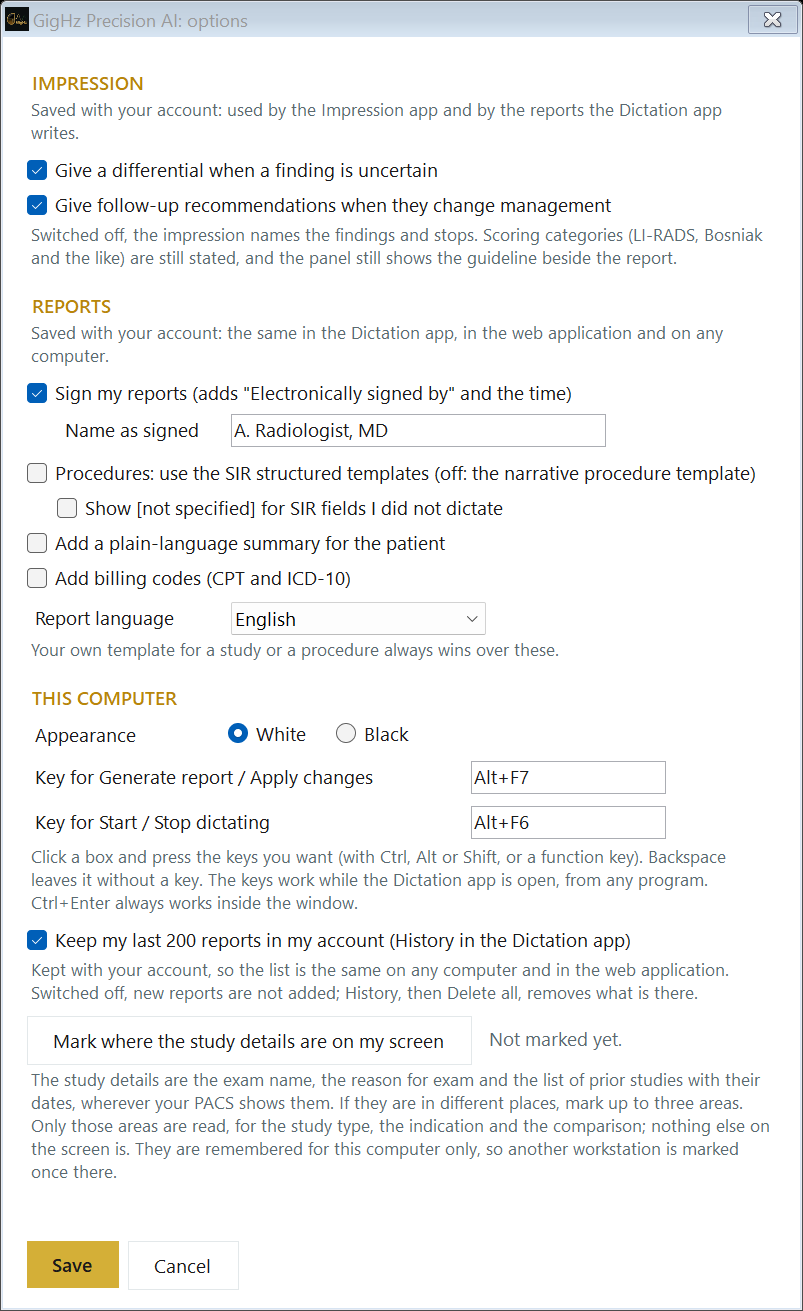
GigHz Precision AI reads the report you dictated and detects when classification criteria apply. It shows the relevant form beside the report, pre-fills what the findings support, and lets you change it; the impression is rewritten with your choice. Differentials and follow-up recommendations are on by default; either can be switched off in Options, and scoring categories are still stated. The AI proposes, you verify.
Two apps, one program
Keep your own dictation system and use the Impression app beside it, or dictate in the Dictation app and place the finished report. Either way the finding is carried into the impression together with the guideline it triggers, and the recommendation stops getting dropped. Switch apps at the top of the window; the one you used last opens next time, on any computer.
Impression, placed in your report
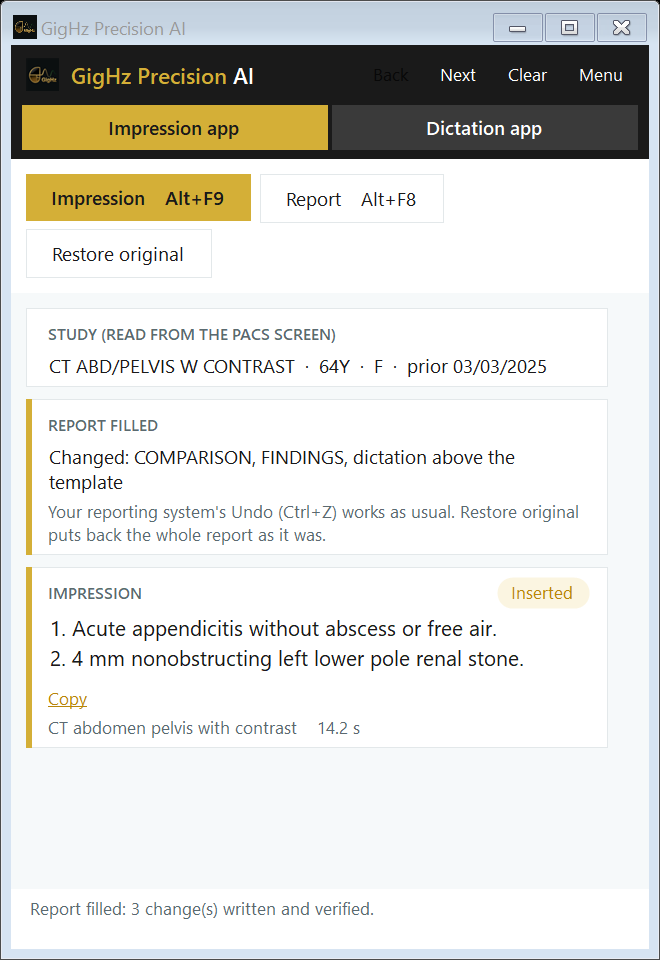
Press Impression (Alt+F9). Actionable findings come first, incidental findings after, duplicates collapsed, with your measurements, sides and certainty kept as you wrote them. It reads the report back to confirm the text landed under IMPRESSION.
Guideline in the impression
A 6 mm solid nodule brings the Fleischner interval into the impression, where the referrer will read it, with the source named. LI-RADS, Bosniak and TI-RADS appear as small forms you can change, and the impression is rewritten with your choice.
Tested with PowerScribe 360
Found automatically. Other Windows reporting programs work once you show the app the report box; browser-based reporting is supported with a Copy fallback. Windows 10 or 11. How it compares with PowerScribe →
Fills the template in your report
In the Impression app, dictate freely and press Report (Alt+F8): each finding goes to its line in the template already open in your reporting system, and the impression is written. Only changed sections are rewritten.
The whole report from your dictation
In the Dictation app, dictate, type or paste the findings and press Generate report. Once the report is written, the same two buttons become Dictate changes and Apply changes: what you say next changes or adds to the report. Then place it in your report or copy it.
Your own templates
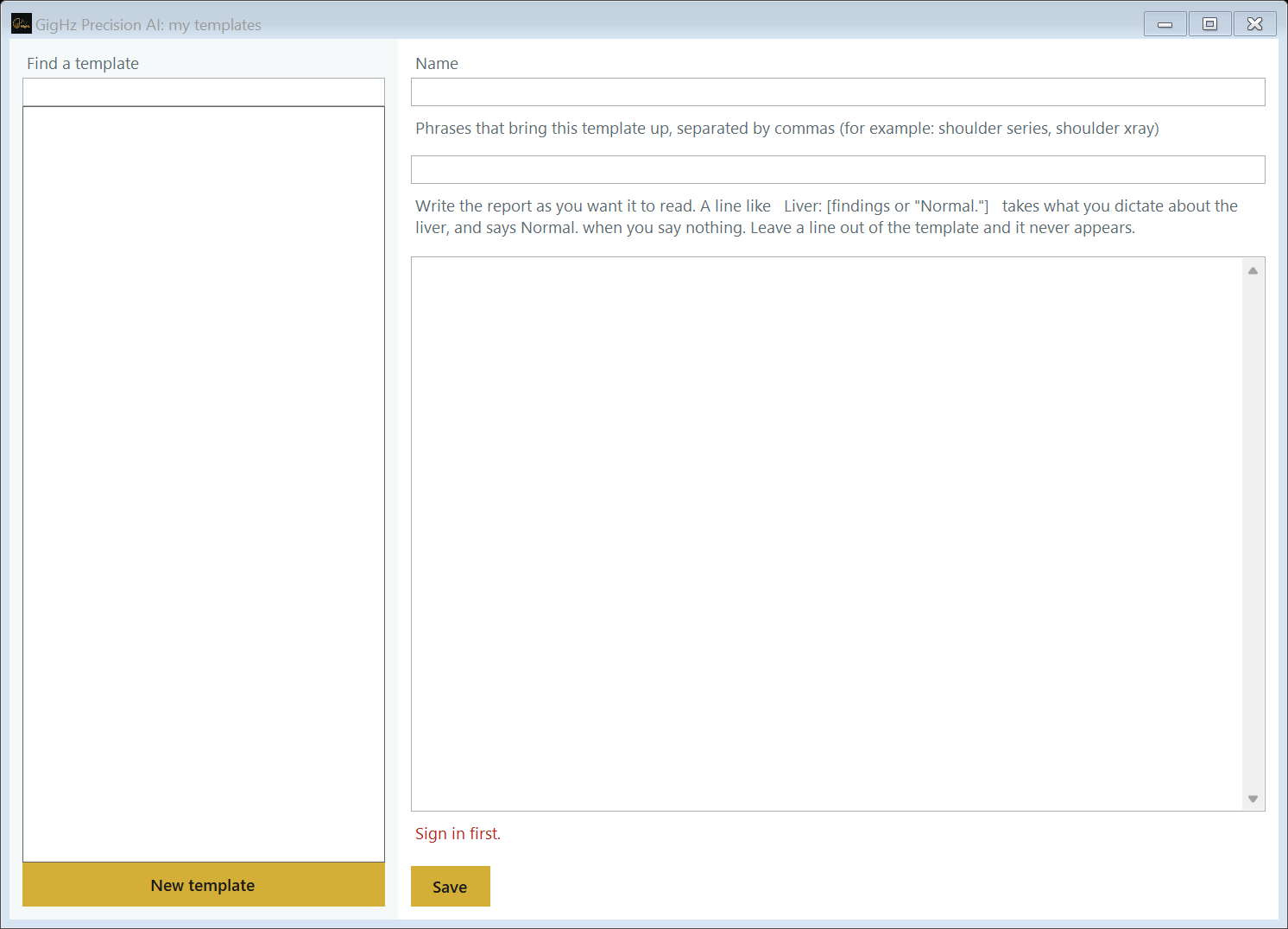
Make your own version of any built-in study or procedure template, or add your own with the phrases that bring it up. It is saved in your account and follows you to another computer. Procedure reports are narrative by default, with SIR structured templates as a setting.
Protocols and appropriateness
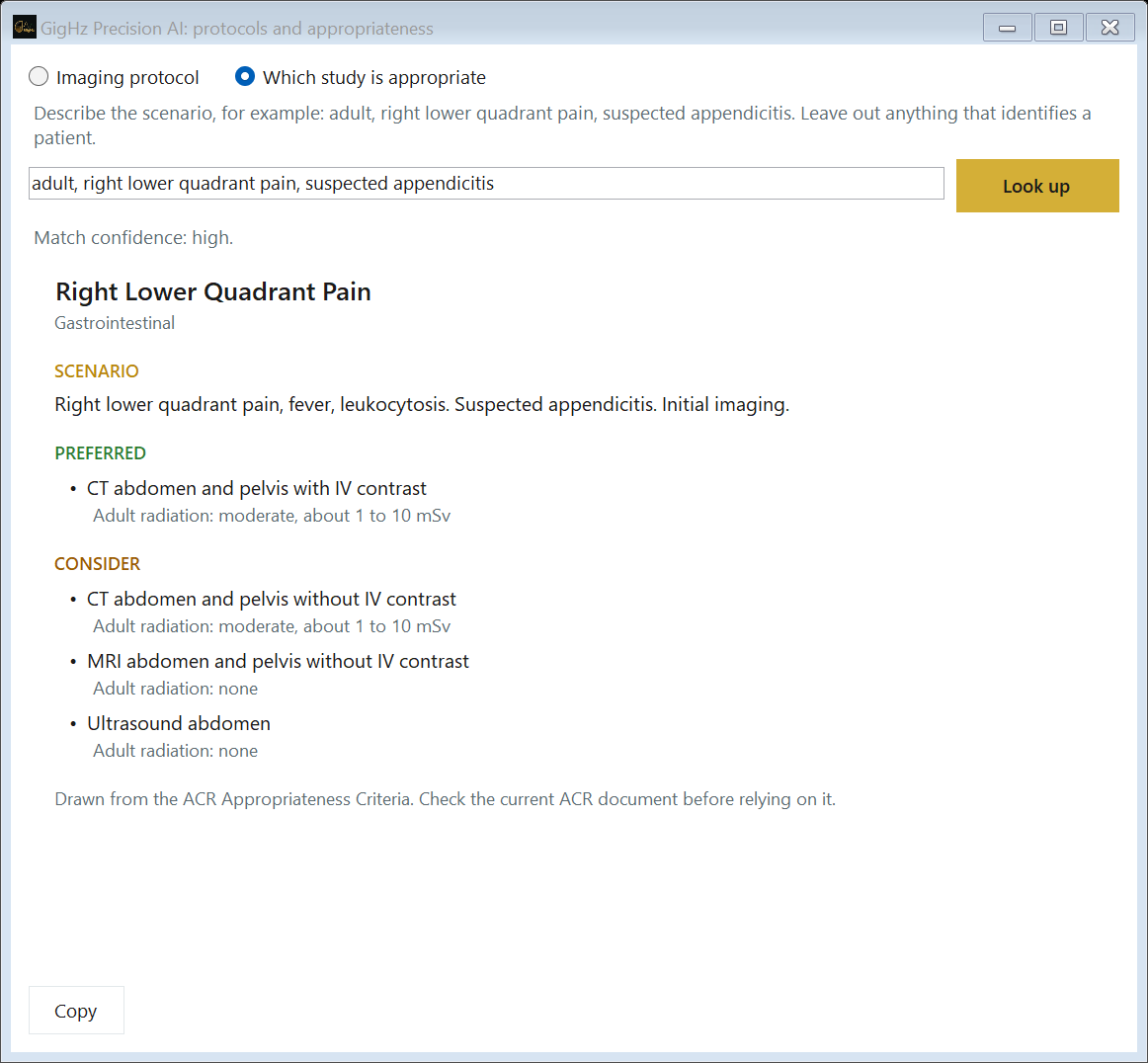
Look up an imaging protocol, or which study is appropriate for a scenario (drawn from the ACR Appropriateness Criteria), from inside the Dictation app. A reference, not a report.
Checks the numbers
Every size in the impression must appear in your report with the same number and unit. If one does not, the impression is not inserted automatically and the app tells you which. The impression policy →
Want the format without the software? Free radiology report templates and worked examples (CT, MRI, X-ray, ultrasound, mammogram) →
Why Precision AI is different from your current dictation tool
Most AI radiology tools work on the image. Precision AI works on the report — the part of radiology that touches every read, every day.
Embedded, not bolted-on
Scoring surfaces inline, in the impression — not as a pop-up calculator the radiologist closes without reading. Your dictation workflow does not change.
Multiple frameworks in one report
A chest CT can hit Lung-RADS, Fleischner, and adrenal washout in the same read. Precision AI can surface all three scoring layers within a single report, for the radiologist to confirm.
Defensible documentation
Each category the radiologist confirms is traceable to the criteria. Quality reviews and medico-legal audits get a structured trail instead of a free-text impression.
Pricing
Three plans, billed monthly. Every trial includes both apps.
Try it free for 90 days. No credit card.
90 days free with a hospital, university or practice email; 30 days with any other email. No card either way, and billing starts only when you pick a plan. Then from $29 a month for the impression alone, $99 a month for the whole app, or $49 a month for residents and fellows.
Institutional email. Sign up with your hospital, university, or practice address. The trial starts immediately and no payment method is required.
Any other email. Sign up with any address and the trial starts immediately. No card is asked for; billing starts only if you choose a plan.
Both apps, then you choose. When the trial ends, your account page ticks the plan that matches what you used. You can tick the other, and nothing is billed until you press Start subscription.
One trial per person. Nothing is charged automatically when it ends — you choose a plan and confirm once.
Full: Impression and Dictation apps
$99/mo
Attending. For practicing radiologists. Billed monthly.
- The Impression app: Impression, Report, and study details read from your PACS screen (exam name, reason for exam, prior studies)
- The Dictation app: the whole report from your dictation, changes by voice, your own templates, protocol look-ups
- Scoring forms and guideline support
- Cancel any time
No card with an institutional email. 30 days with any other email.
Full: Resident / Fellow
$49/mo
For physicians in accredited training programs. Billed monthly.
- Both apps, the same as the Attending plan — nothing removed
- Keeps the trainee rate for one full year after you finish training
- Cancel any time
No card with a university or hospital email. 30 days with any other email.
Impression app only
$29/mo
For radiologists who only want the impression written and scored. Billed monthly.
- The Impression button, scoring forms and guideline support
- No Dictation app and no Report button
- Move up to Full at any time
- Cancel any time
The trial includes both apps. No card with an institutional email; 30 days with any other email.
How the trainee rate works. You enter your expected graduation year at signup and pay $49/month for the Full plan through training. In August of your graduation year the trainee rate is extended one more year — a thank-you for growing with us. In August of the following year the plan moves to the standard $99 rate; you are emailed before it happens, and the new rate starts on your next billing cycle. There is never a mid-cycle or partial charge.
When the trial ends. You are emailed before it does. Your account page ticks the plan that matches what you used (the Impression app only plan if that is all you used, the Full plan if you used the Dictation app or Report). You can tick the other one, and nothing is billed until you press Start subscription, because a trial never has a card. Moving up is immediate; moving down keeps the whole app until the end of the paid month. Cancel my subscription is on the account page: no further charge, the app works to the end of the paid month, and the account is kept.
No onboarding fee, no long-term contract. (Legacy dictation vendors charge up to $525 just to start.) Group or teleradiology deployment? Talk to us.
Listed on Capterra ·
Already have an account? Sign in
How GigHz Precision AI compares
We don't try to replace the enterprise systems. The full alternatives hub has the honest, side-by-side breakdown of where each tool fits — and where Precision AI is the better call.
vs PowerScribe One · vs Solventum Fluency · vs Dragon Medical One · vs Rad AI · vs Sirona Medical
Who it is built for
Diagnostic + IR — full-volume practices
Body imaging, abdominal, thoracic, IR — the radiologists doing the highest scoring-framework volume. Validation Partner program is currently selecting practices.
Apply →Free access in exchange for feedback
Residency and fellowship trainees get 3+ months of free access. Apply with PGY year and program. Designed to teach structured reporting alongside clinical scoring frameworks.
Apply (residents) →Standardize departmental reporting
For practice directors who want consistency across radiologists — the same finding reported the same way, with traceable scoring.
Talk to us →Enforce quality across distributed reads
Teleradiology groups whose radiologists work across many client systems are a strong fit for baked-in scoring frameworks — same report quality regardless of site template.
Contact →Support physician judgment. Never replace it.
GigHz Precision AI starts with the radiologist's words. You dictate the findings in your own dictation system; Precision AI reads the report, writes the impression and places it under IMPRESSION, or fills the template already open in your reporting system. When the report states the features a framework needs, it shows scoring support and guideline-aware language for frameworks such as LI-RADS, Lung-RADS, Fleischner, Bosniak, adrenal washout, TI-RADS and PI-RADS, with the source named. The radiologist remains responsible for review, edits, scoring confirmation, and final sign-off.
What it does not do
Precision AI does not interpret images by itself. It does not replace PACS, RIS, EHR, dictation infrastructure, or an enterprise reporting platform. It does not autonomously finalize reports. It is not a substitute for clinical judgment, institutional policy, or current guideline review.
The point is not to remove the radiologist. The point is to reduce the small reporting burdens that accumulate during a long list — formatting, remembering thresholds, opening calculators, checking white papers, and keeping report language consistent. That is where Precision AI fits.
Three ways in
🚀 Start free
Sign up with your institutional email — hospital, university, or practice — and get 90 days free with no credit card. Any other email gets 30 days free, also with no card.
Start free trial →🎓 Residents & Fellows
The same trial as everyone (90 days free with an institutional email, no card), then $49/month for the Full plan with both apps — nothing removed — and you keep the trainee rate for a full year after you finish training.
Trainee details →🏥 Group / teleradiology
Rolling out across a group or a distributed reading operation? Talk to a human about deployment — every radiologist still starts with the same free trial.
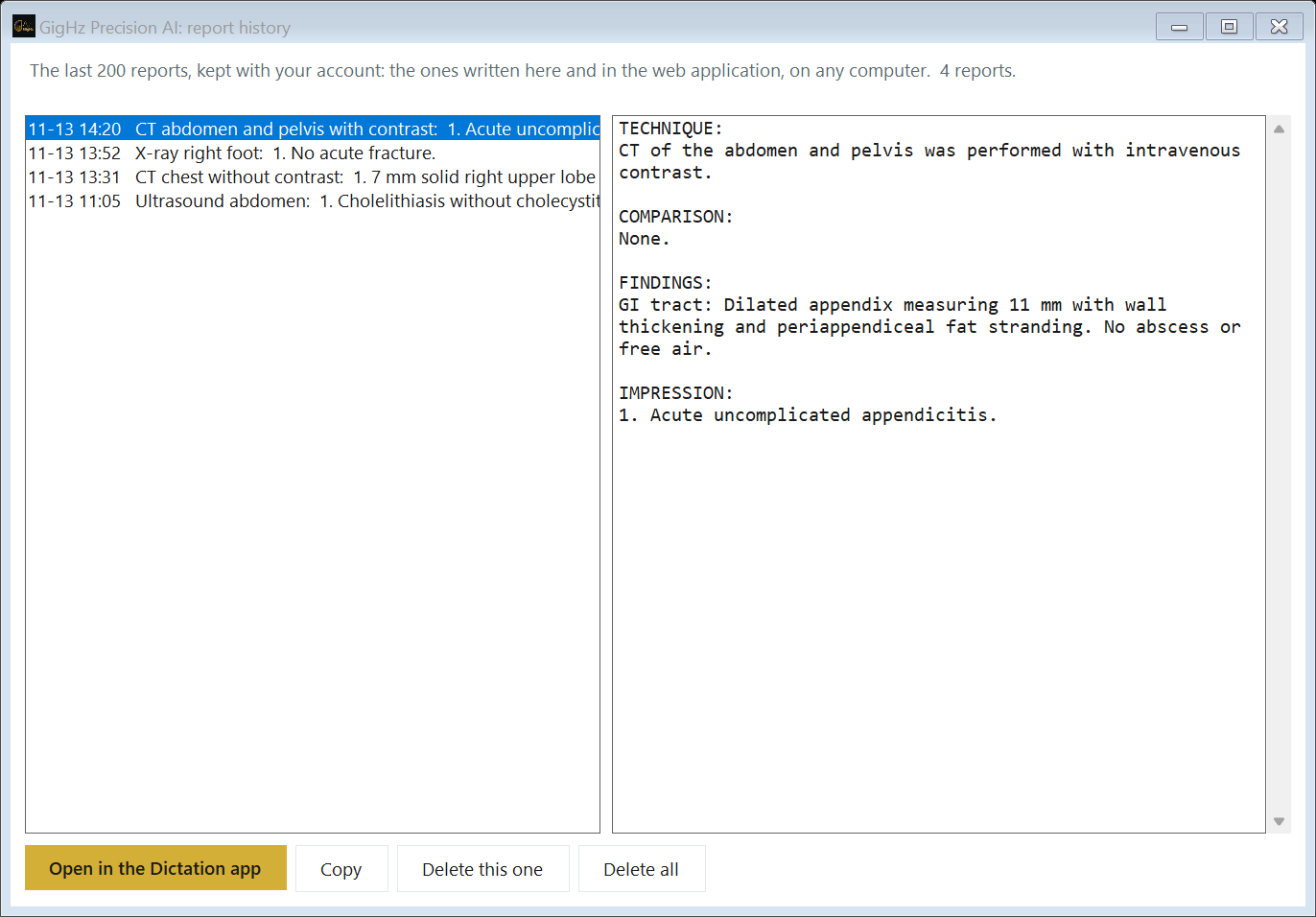
Contact →Hosted on AWS in a United States region under a signed Business Associate Agreement. Report text sent for an impression is not stored. Reports you write in the Dictation app are kept in your own history: your last 200 finished reports, with your account, so the list is the same on any computer; delete one or all, or switch keeping off in Options. The dictation itself and the audio are not kept. History is held in GigHz's own AWS account, on an encrypted disk, readable only through your own sign-in. TLS in transit, no third-party advertising or analytics in the application. Precision AI never asks for a patient name or MRN — and does not need one. Security & Data Handling →
Documentation
Everything about setup, the impression, scoring, privacy and billing lives in the Precision AI docs.
Common questions
Is this another image-analysis AI?
No. Precision AI works on the report layer — reading what you dictated, writing the impression, and clinical scoring. It does not analyze pixels. The radiologist still reads the study; Precision AI handles how that read becomes a finished report, in your own dictation system with the Impression app or in its own Dictation app.
Which scoring frameworks are covered?
LI-RADS (current version), Lung-RADS, Fleischner Society follow-up criteria, Bosniak v2019, adrenal washout calculation, and a growing list of additional frameworks. New frameworks are added based on Validation Partner feedback.
What does it cost?
Full plan (Impression and Dictation apps): $99/month, or $49/month for residents and fellows, and the trainee rate continues for a full year after you finish training. Impression app only: $29/month. Every plan starts with a free trial of both apps: 90 days with an institutional email, 30 days otherwise, no card. Billed monthly; cancel any time from your account page, and the app works to the end of the paid month. Group and teleradiology deployments: contact us.
Do I need a credit card to try it?
No. Nobody is asked for a card. An institutional email gets 90 days free; any other email gets 30 days. Billing starts only when you pick a plan. One trial per person.
What happens to my account if I stop paying?
The account locks but your settings are kept. One click reactivates.
Does it handle PHI?
Precision AI is hosted on AWS in a United States region under a signed Business Associate Agreement, with encrypted storage. Report text sent for an impression is not stored. Reports you write in the Dictation app are kept in your own history: your last 200 finished reports, with your account, so the list is the same on any computer; delete one or all, or switch keeping off in Options. The dictation itself and the audio are not kept. The product never asks for a patient name or MRN and does not need one.
I'm a fellow finishing this year — do I lose the trainee rate immediately?
No. The trainee rate continues for a full year after you finish training, then moves to the standard rate with advance notice — the new rate starts on your next billing cycle, never mid-cycle.
What's the medico-legal posture?
Precision AI surfaces classification with traceable rationale. The radiologist remains the responsible interpreter and finalizes the report. The structured trail of how each category was assigned is more defensible than free-text impressions, not less.
Who built it?
Pouyan Golshani, MD — practicing interventional radiologist — and the GigHz team. Built because the report is where every read ends up and where consistency tooling barely exists.
The guideline should make it into the report.
No credit card. 90 days free with an institutional email, 30 days otherwise. Then from $29 a month for the impression alone, $99 a month for the whole app, or $49 a month for residents and fellows.
One Windows program file to download: no installer, no administrator rights. Needs Windows 10 or 11; tested with PowerScribe 360.
GigHz Precision AI surfaces clinical scoring with traceable rationale to support — not replace — the interpreting radiologist. The radiologist remains responsible for the final report. A GigHz product. Built by Pouyan Golshani, MD.
Written and reviewed by Pouyan Golshani, MD, Interventional Radiologist — Last updated November 15, 2026
Part of the GigHz library: systems doctors were never taught.